Overview of Facebook Advertising
In this video Megan Adams provides a comprehensive breakdown of Facebook Advertising. She provides a step by step guide of how to build, design and distribute ads on Facebook for as little as $5/day. (Adams. 2019)
So why run an ad on Facebook? Megan explains that this is an excellent forum for advertising because your content is visible to your audience in a place where they are actively engaged (Adams. 2019). Makes sense.
Facebook is the world’s largest social media platform boosting 2.38B users globally (Hutchinson, 2019)and as Megan walks us further into the process, I can see how powerful this tool can be.
Like Facebook led the charge in social media platforms that help transition even our grandparent’s online, now it seems that Facebook is making a similar change in the advertising space. For a low investment, anyone can access this promotion tool. Which is pretty amazing if you think of it.
How Facebook Ads Work
Before we can hop in and create a Facebook ad we should first understand how it works. Megan explains that there are three main areas of focus related to Facebook ads:
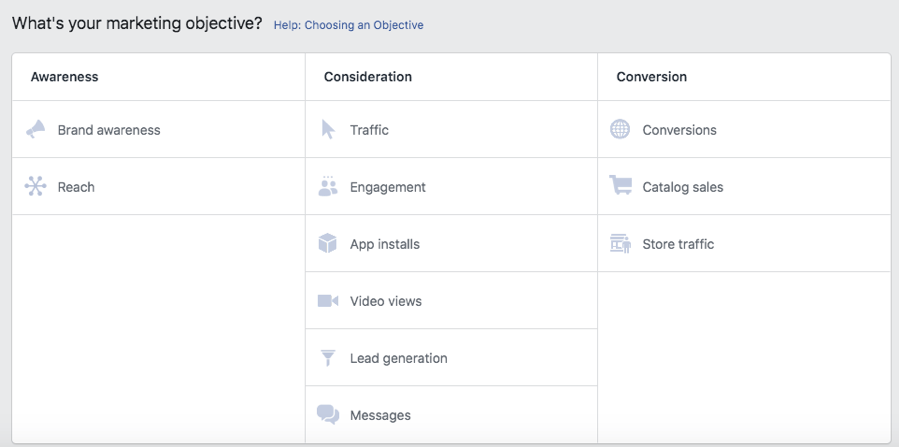
- Campaigns: defines your objective. This is essentially, what are you trying to achieve with this ad? Facebook has a great categorization system to help you define your objective effectively (Adams. 2019).
- Ad Set:outlines your target, placement and bid settings (Adams. 2019).
- Ad: Image, link and message (Adams. 2019).
Facebooks offers some unique and impactful customization options that are very impressive. For example, Megan shows us how we can target very specific audiences by selecting preferences like:
- Location: cities, countries and neighborhoods
- Demographics: age, gender and education
- Behaviors: purchase habits, device use and recent life events
- Interests: hobbies or page likes
- Connections: connected to pages, event or applications
- Build custom audiences: based on customer data. You can upload your own customer data and Facebook will identify if any of your customers have Facebook accounts and push ads to their news feeds.

HOW TO CREATE FACEBOOK ADS
So let’s get going, I have set up a Facebook ad for a family members business that I will be using as an example. Through the Facebook Ads Manager tool, setting up a new ad was surprising straight forward.
Select the Green +Create button and you’re on your way.
Selecting your Objective. This tool guides you to make the appropriate selection for your business objective.
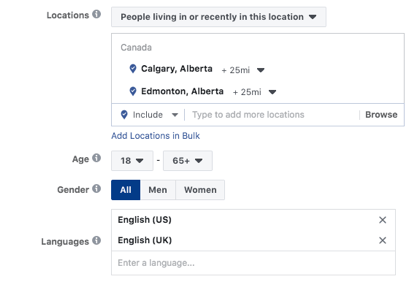
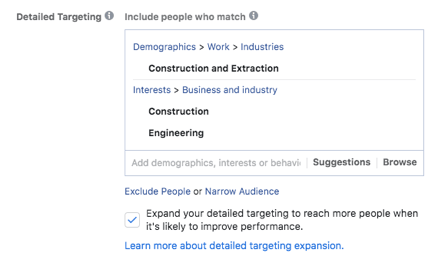
After you have selected your objective, you are lead to another screen that allows you to provide more specific details about your target audience:
Items like, location, age, gender, and detailed targeting information.
So now that we have defined our audience, it is time for us to design our ad. The Facebook tool walks you through every step in the process. You can add an image, a video or even a series of images. You add your supporting text and Facebook even provides you with sample screen shots of what your ad will look like on the various social media supported platforms.
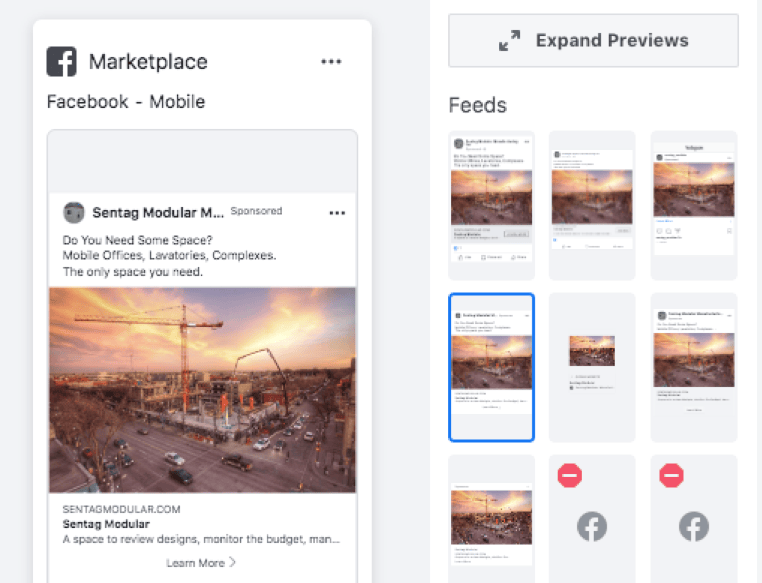
Once you have completed these steps, you hit Publish and you are on your way.
View Your Advertising Ads
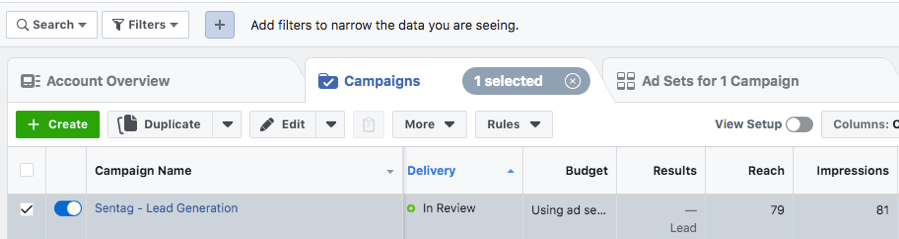
To view your publish ad, you will need to access your Ads Manager. This can be completed by logging into your Facebook account and using the drop down arrow directly beside your name. Select Ads Manager and it will redirect you to a page providing you a listing of your campaigns.
View Your Advertising Data
Before we can view our advertising data, we should review some basic terminology to help us understand what we are seeing. The below basic marketing terms were provided by Megan Adams:
- Clinks: total number of clicks on the ad
- CTR (Click Through Rate) the total number of clicks received, divided by the number of impressions
- Impressions:number of times your ad has appeared on page/news feed
- Cost per 1000 Impressions(CPM): avg cost paid to receive 1000 impressions
- Cost per Click (CPC):the amount charged when someone interacts with an ad (clinks on link)
- Target:lowest CPC well still returning the results you are looking for.
- Frequency:the avg number of times an ad is shown to each person. Advertises will spread out the ads to avoid “Ad Fatigue” meaning where someone sees your too much
- Reach: number of people who saw your ad.

The ad that I have created has only run for just over a day so there is not a lot of data yet. As we can see in Figure 6, there has been 79 peopled reached and 81 impressions.
As this ad builds more stats, I can take advantage of Facebooks reports to have a better understanding of how my ad is performing.
Implement Best Practices
Megan describes the following best practices in her tutorial video:
- Write good ads: this seems obvious but definitely something that is a best practice. A good ad includes a clear Call to Action button.
- Use eye catching images. There are even some free Shutterstock images available through Instagram.
- Have someone else read your ad for a fresh set of eyes.
- Test and run multiple variations to see what works best. Example, different images.
Conclusion
I was very impressed with the capabilities of Facebook’s advertising feature. It is a great service for a very low investment. I personally enjoy how accessible it is for any person or any business. A great example of how advertising and social media can work together to take us to the next level in advertising.
To provide an actionable outcome, I will continue to use Facebook Ad campigns for future events. I find the program to be extremely easy to use and very affordable. It is exciting to know that there is an effective advertising service out there that can support small and large business’s alike.
References
- Adams, M. (2019, October 2). Advertising on Facebook. Retrieved from Linked In Learning: https://www.linkedin.com/learning/advertising-on-facebook-2/facebook-is-an-advertiser-s-dream?u=2109516
- Hutchinson, A. (2019, April 24). Facebook Reaches 2.38 Billion Users, Beats Revenue Estimates in Latest Update. Retrieved from Social Media Today: https://www.socialmediatoday.com/news/facebook-reaches-238-billion-users-beats-revenue-estimates-in-latest-upda/553403/

